INSIDE THE PHOTO COLORING PAGE MAKER
Coloring Page Maker: How Does It Trace a Photo?
This coloring page maker traces visible edges in your photo right in the browser. It does not redraw the subject or invent missing details. The browser reads the selected picture, finds edge changes, and lays the resulting line art onto a printable page. Your photo is not uploaded by this tool.
Try the photo coloring page maker
What this coloring page maker does with the selected file
The current tool accepts one JPG, JPEG, PNG, or WEBP photo at a time. It checks the file type and size in the browser, opens the image as a bitmap, and reads its pixels into a canvas. The photo is then scaled down for edge processing when its longest side exceeds the internal processing limit. The downloaded paper-sized image is still laid out separately for A4 or US Letter at 300 DPI.
- It prepares pixel values. The code makes a grayscale brightness map, then applies a small blur. In the implementation, that blur uses a five-point kernel across each direction to soften fine sensor grain while keeping larger contours.
- It looks for local changes. A 3-by-3 neighborhood is checked for brightness changes. The current edge response also considers color-channel changes, so neighboring colors can form a boundary even when their brightness is similar.
- It thins and joins lines. The algorithm keeps local edge peaks, then treats weaker marks differently depending on whether they touch a stronger contour. This helps separate a clear boundary from an isolated texture mark; it cannot decide which object is important.
- It lays out a printable preview. The selected line style adjusts edge thresholds and response. The tool draws the result onto a white A4 or US Letter canvas, fits the full photo inside the page, and creates PNG and PDF downloads in the browser.
Why a traced page can keep background detail
An edge tracer responds to visible boundaries, not to the meaning of a scene. Fur, leaves, pavement texture, window frames, and an object behind the main subject all create pixel changes. If those boundaries are in the photo, they can appear in the line art. A style preset changes which edge responses are emphasized; it is not a subject-isolation or background-removal control.
What that means for your result: the preview is the evidence to use before printing. If the background has more marks than you want, crop the source photo first or choose a simpler scene. This tool does not recover a blurred boundary, remove an object, or redraw a missing part.
A real example: the dog stays recognizable, but the setting is traced too
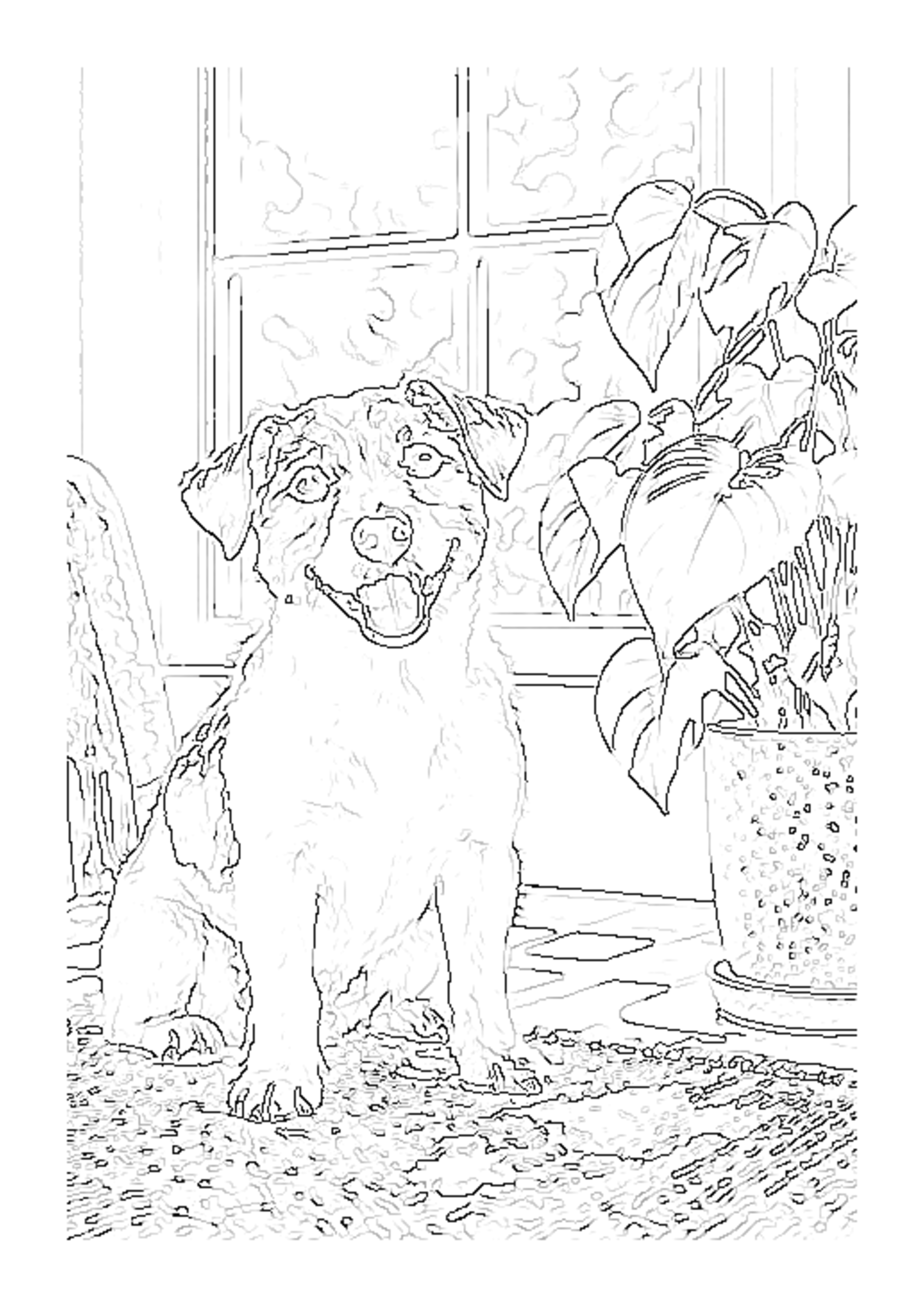
In the site's existing sample run, the dog's outer shape, eyes, nose, and open mouth remained easy to recognize. The window frame, plant leaves, and textured rug also left marks. That pair is useful for showing the tool's actual trade-off: it can preserve a recognizable subject while still tracing background detail. It is one tested photo, not a promise for every input.

How this differs from AI coloring page generation
This tool follows the image's detected edges. It does not interpret a prompt, create a new pose, or add details that were not visible in the source. The three benchmark pages reviewed for this article present AI-based coloring-page workflows; the particular distinction documented here is this site's local edge-tracing pipeline and its limits, based on the site's code and sample output.
That distinction can help you choose a workflow. Use an edge tracer when you want the uploaded picture's visible structure to remain the basis of the page. If you want a newly imagined scene or subject changes, a generative workflow is designed for a different job.
Coloring page maker questions
Does this coloring page maker upload my photo?
No. The image processing happens in this browser. The selected photo is not sent to the tool's server.
Does the tool remove the background?
No. It traces visible edges across the picture. Crop the photo before selecting it if you want less background in the final page.
Why are some lines missing?
A blurred, low-contrast, very small, or partly covered boundary may not create a strong edge in the source pixels. A line tracer cannot restore information that is not present in the image.
What can I download?
The tool creates PNG and PDF files for A4 or US Letter paper at 300 DPI, in portrait or landscape orientation.
Read the photo-to-line-art workflow, the five-style guide, or the real before-and-after examples. See the photo coloring page maker guide.
Benchmark pages reviewed September 30, 2026: Mimi Panda photo-to-coloring-page page, iColoring AI generator, and Canva AI coloring page generator. Competitor descriptions are linked for context; the technical process and sample observations above are based on this site's implementation and test output.